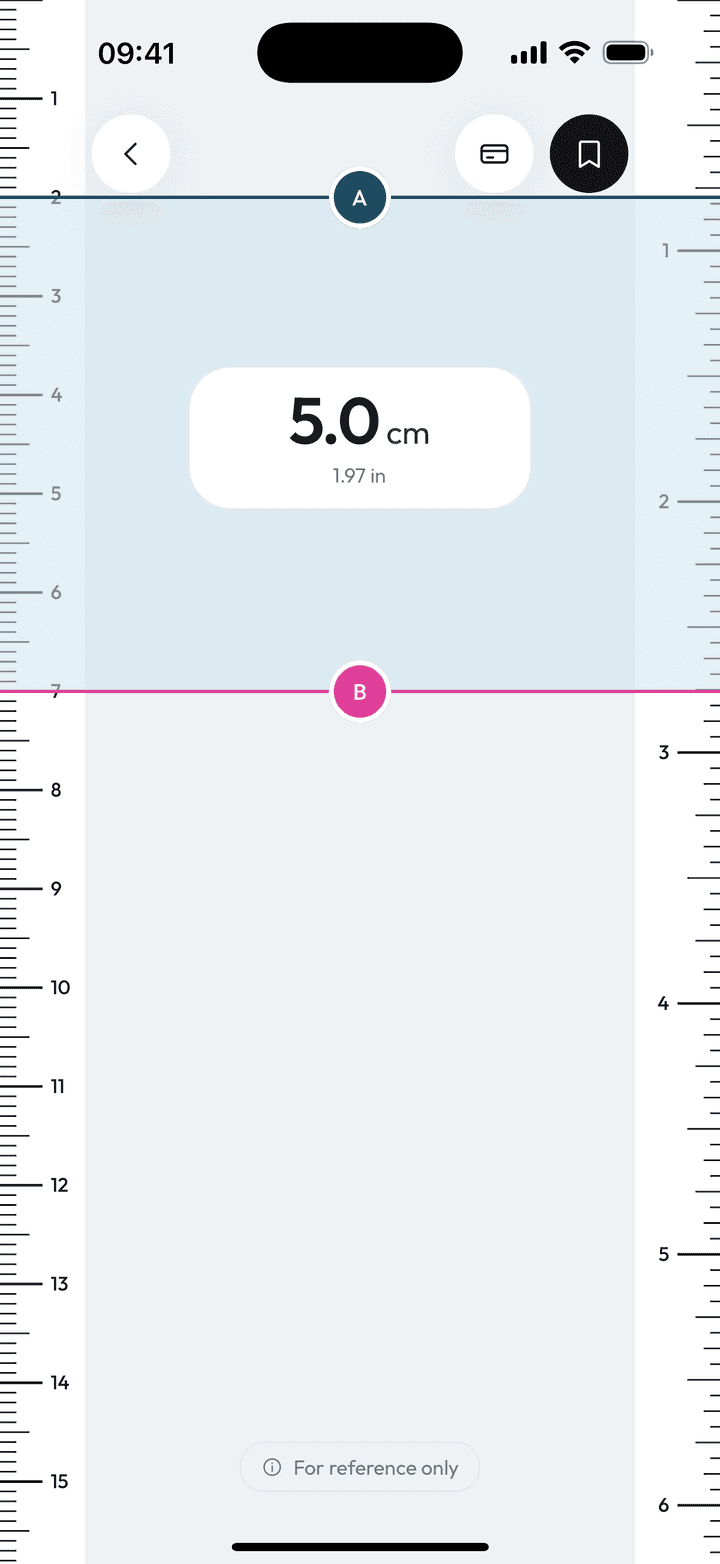
Measure Kit's ruler is a free on-screen ruler for Android and, soon, iPhone. It shows millimetres, centimetres and 1/16-inch markings, lets you drag two handles to read a length in both units, and can be calibrated with a bank card for real-size accuracy.
| Units | mm, cm and inches (1/16 in steps) |
|---|---|
| Calibration | Bank card on Android; built-in device table on iPhone and iPad |
| Cost | Free, no limits |
| Needs | No account, no internet, no special permissions |
By Ship AI Lab. Last updated . Written from how the Measure Kit app actually behaves.
How the on-screen ruler works
The ruler draws a millimetre and centimetre scale along one edge of the screen and an inch scale, in sixteenths, along the opposite edge. Zero sits at the physical edge of your phone, so you can hold an object against the glass and read it straight off the scale.
For anything that does not line up with zero, use the two handles. Drag handle A and handle B to the two ends of the thing you are measuring. The distance between them appears in large type in the unit you picked in Settings (centimetres or inches), with the other unit shown underneath. You never have to convert by hand.
Why a phone ruler needs calibration
A screen ruler is only as good as the app's idea of how many pixels fit in a millimetre. iPhones and iPads report a model, so Measure Kit uses a built-in table of pixel densities for each device. Android phones do not expose a trustworthy value, so on Android the ruler asks you to calibrate once when you first open it.
Calibration takes about ten seconds. Place a bank card or any ID-1 sized card on the screen and drag the blue handle until the outline matches the short edge of the card. The app stores that scale and shows a "calibrated" note on the ruler from then on. You can recalibrate at any time from the card button.
How to measure with the ruler, step by step
- Open Ruler from the home screenOn Android, calibrate with a bank card the first time. It is a one-off step you can skip and redo later.
- Place the object on the screenRest it flat against the glass. For something longer than the screen, measure it in sections.
- Drag handles A and B to the endsThe distance updates live in centimetres or inches, with the second unit shown below it.
- Save it if you need it laterTap the save button. Free accounts keep up to three measurements; Pro keeps unlimited history with notes.
What people use a phone ruler for
Small objects and parts
Screws, keys, jewellery, buttons, fabric swatches and anything else shorter than your screen.
Checking sizes you do not have a ruler for
Is that cable the right length? Will this photo fit the frame? A phone is faster than finding a tape.
Converting between metric and imperial
Both units are shown together, which is handy when a pattern or a product page uses the other system.
Crafts and sewing
The 1/16-inch markings suit patterns and woodworking dimensions given in fractions.
Accuracy and limits of a screen ruler
- The ruler is as long as your screen, so it suits objects up to roughly the height or width of the phone. For longer distances use the AR tape measure.
- Accuracy depends on calibration and on how the screen is rendered. Measurements are approximate and for reference only, not for anything safety-critical.
- A thick case or screen protector can make an object sit slightly away from the glass. Read the scale from straight above to avoid parallax.
Ruler questions, answered
Is the ruler app free?
Yes. The ruler has no usage limits and no ads. Only the AR tape measure, magnetic field detector and unlimited history need Pro.
Why does the ruler ask me to calibrate with a card?
Android phones do not report their real screen density reliably, so the card gives the app a known length to scale from. iPhones and iPads use a built-in table instead.
Does the ruler show inches and centimetres at the same time?
Yes. One unit is the main reading and the other appears under it. You choose which one leads in Settings.
Can I measure something longer than my phone?
Not with the ruler. Use the AR tape measure to measure distances, paths and areas through the camera, or measure in sections.
Does it work offline?
Yes. The ruler needs no internet connection and no account.