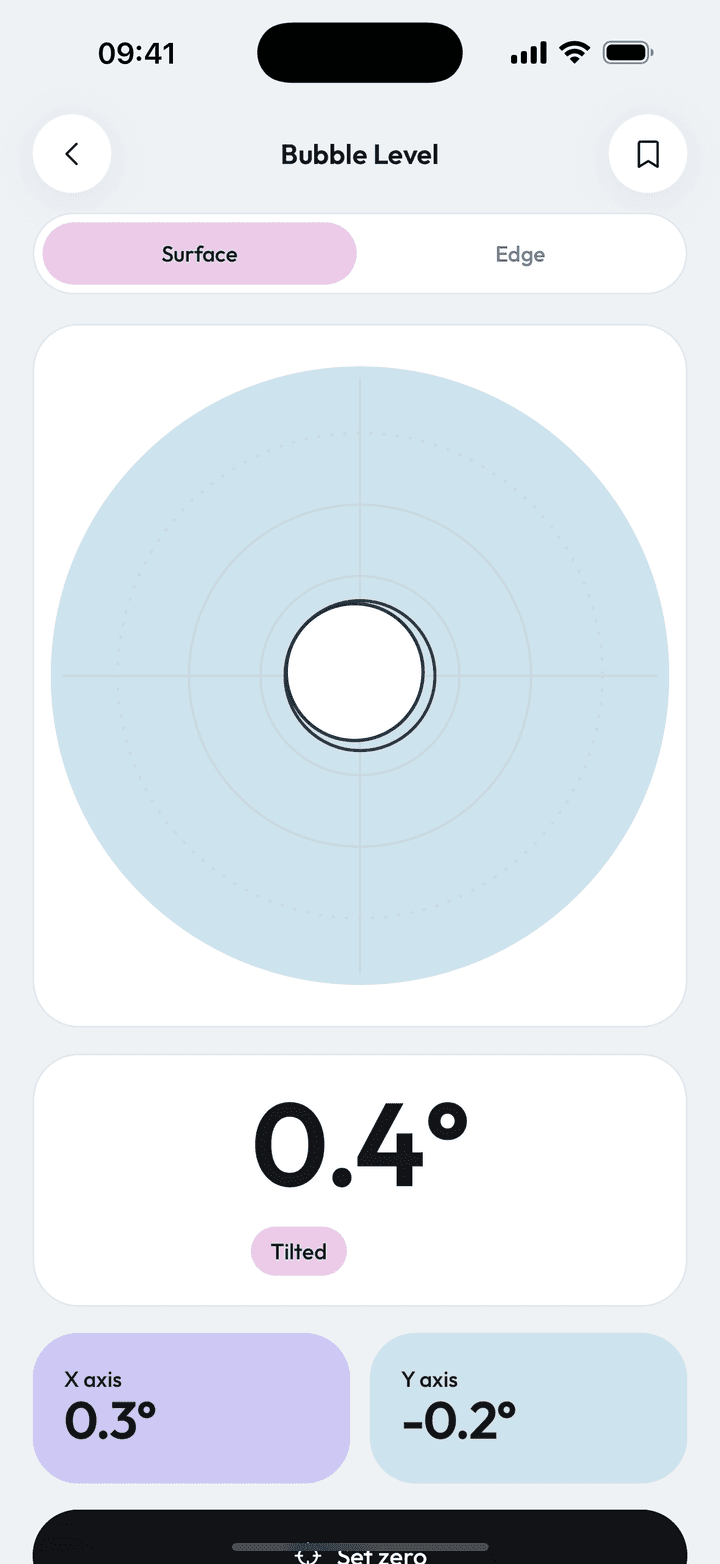
Measure Kit's bubble level is a free digital spirit level. Surface mode shows a bubble and the combined tilt in degrees for flat objects, edge mode reads the angle of the phone's long edge, and the phone gives a haptic tick when the reading reaches 0.0°.
| Modes | Surface and edge |
|---|---|
| Level threshold | Within 0.1° is shown as 0.0° with a haptic tick |
| Calibration | Set-zero per mode, with reset |
| Cost | Free, no limits |
By Ship AI Lab. Last updated . Written from how the Measure Kit app actually behaves.
Two modes for two jobs
Surface mode is for anything flat. Put the phone on a table, a shelf or a window sill and a bubble moves across a dial the way it would in a traditional spirit level. The big number is the combined tilt in degrees, built from the forward-back and left-right angles reported by the phone's motion sensors.
Edge mode is for vertical and angled things. Stand the phone on its long edge against a door frame, a pipe or a ladder and the app reports the angle of that edge. The screen rotates so the lower long edge always counts as "down", so it also works in landscape.
Haptic feedback and the 0.0° threshold
Anything within 0.1° of flat is shown as exactly 0.0°, and the phone gives one firm haptic tick the moment you reach it. You can adjust a shelf bracket while looking at the shelf rather than the phone, then confirm by feel.
Surface mode locks the screen to portrait so the display does not spin while you are tilting the phone. Edge mode unlocks rotation because the phone has to follow whatever you are measuring.
Set zero for a perfect baseline
No sensor is perfect, and a case can leave the phone sitting very slightly off. Rest the phone on a surface you trust to be level, tap the calibrate button and Measure Kit stores that reading as zero for the current mode. A reset button removes the offset again.
How to use the bubble level
- Pick Surface or Edge modeSurface for flat things, Edge for anything you can stand the phone against on its long side.
- Calibrate on a known-flat surface (optional)Tap set zero while the phone is on a surface you trust. Do this once per mode.
- Place the phone on what you are checkingKeep it still. The angle updates live and ticks when you hit 0.0°.
- Save the readingTap save to keep the angle in History, for example before and after adjusting.
Where a phone level comes in handy
Hanging pictures and shelves
Rest the phone on the frame or on the bracket and adjust until it ticks.
Levelling appliances and furniture
Washing machines, tables and fridges wobble when a foot is off. Check each side.
Camping and caravans
Find out which way a pitch slopes before you park or pitch a tent.
Checking a slope
Edge mode reads the angle of a ramp, a roof pitch or a stair stringer in degrees.
What to keep in mind
- A phone is not a certified level. Treat readings as approximate and verify critical work with a proper tool.
- Calibrate on a surface you trust. If that surface is itself off, the zero will be off too.
- Edge mode assumes the phone's long edge is the reference. A rounded or heavily cased phone will read slightly differently, so calibrate with the case on.
Bubble level questions, answered
Is the bubble level app free?
Yes. Both modes, calibration and haptics are free and have no limits.
How accurate is a phone as a level?
Typically within a fraction of a degree once calibrated, but it is not a certified instrument. It is ideal for pictures, shelves and furniture, less so for precision engineering.
What does surface mode measure?
The tilt of the phone lying flat, as a bubble on a dial plus a single combined angle in degrees.
What does edge mode measure?
The angle of the phone's long edge, so you can stand it against a surface and read the slope. It works in landscape too.
Why did the phone vibrate?
It ticks once when the reading reaches 0.0°, which means within 0.1° of level.